Why Kudos Failed (And How WalletFit Fixes Mobile Credit Card Rewards)
Desktop browser extensions promised to automate credit card rewards. Instead, they hit an insurmountable reality: 78%+ of consumer spending happens in-person on mobile. Here is the post-mortem on why browser extensions failed cardholders—and how WalletFit built the true mobile-first rewards engine.
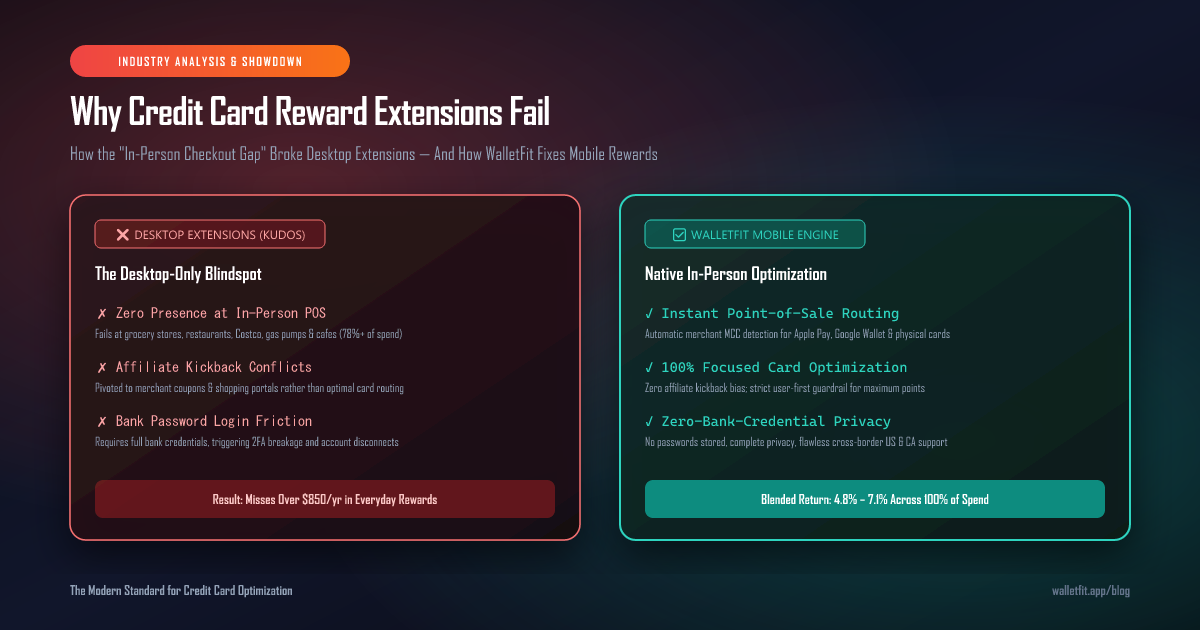
Executive Summary: The Rise and Fall of the Browser Extension Model
Between 2022 and 2024, a wave of fintech startups launched desktop browser extensions promising to revolutionize personal finance. Companies like Kudos and early browser-based autofill tools raised tens of millions in venture capital on a simple premise: when a consumer shops online on a desktop browser, an extension can pop up at checkout and select the credit card that yields the highest cash back or points multiplier.
By 2026, however, the desktop extension model has largely collapsed for serious credit card optimizers. Millions of users uninstalled or disabled their extensions, citing frequent login disconnections, aggressive pushes toward affiliate coupon codes, and a fundamental failure to assist them where they spend almost all their money: physical point-of-sale checkouts in the real world.
Understanding why Kudos and browser extensions failed requires looking at the structural shifts in consumer payments, the conflict between affiliate revenue and user intent, and why true credit card optimization must live natively on your mobile phone.
A desktop browser extension cannot stand next to you at the grocery register, sit with you at the restaurant table, or tap your phone at the gas pump—meaning it is physically absent for more than $8 out of every $10 of your daily spending.
The "In-Person Checkout Gap": Where 80%+ of Card Rewards Are Lost
The fatal flaw of desktop-only credit card tools is what payment economists call the In-Person Checkout Gap. While e-commerce accounts for a significant portion of consumer electronics and apparel, the highest-multiplier credit card bonus categories (groceries, dining, gas, transit, and wholesale clubs) are overwhelmingly transacted in-person via Apple Pay, Google Wallet, or physical card tap.
According to North American consumer payment data in 2026, here is where household credit card spending actually occurs:
| Spending Category | Typical Multiplier / Reward | % In-Person (POS / Tap / Mobile Wallet) | % Desktop E-Commerce | Can a Browser Extension Help? |
|---|---|---|---|---|
| Supermarkets & Groceries | 4x–5x Points (Amex Gold / Cobalt) | 88.4% | 11.6% | ❌ NO (Physical Supermarket) |
| Dining, Cafes & Bars | 3x–5x Points (Chase / Amex) | 91.2% | 8.8% | ❌ NO (In-Person Dining) |
| Gas Stations & EV Charging | 4%–5% Cash Back (Citi / CIBC) | 97.6% | 2.4% | ❌ NO (Pump / Station) |
| Wholesale Clubs (Costco / Sam's) | 1.5%–3% Flat Return / Custom MC | 86.5% | 13.5% | ❌ NO (In-Warehouse Checkout) |
| Pharmacies & Drugstores | 3x Points (Freedom Unlimited / Flex) | 82.1% | 17.9% | ❌ NO (Physical Counter) |
| Everyday Retail & Apparel | 1.5x–2x Catch-All Floor | 44.0% | 56.0% | ⚠️ Partial (Only on Desktop) |
| Weighted Average Total Spend | 3.5% – 5.2% Target Yield | 78.3% In-Person | 21.7% Desktop | ❌ Fails 78%+ of Total Volume |
When an optimization tool only works on desktop Chrome or Safari, it ignores 78.3% of your transaction volume. A cardholder carrying a 3-card credit card trifecta who uses the wrong card at the grocery checkout leaks $40 to $70 every single month—far outweighing any occasional $2 desktop checkout autofill perk.
The Flawed Business Model: Affiliate Pivot vs. Card Optimization
Why did browser extensions like Kudos struggle to retain active card optimizers? The answer lies in their underlying revenue architecture.
The Affiliate Incentive Trap
Most browser extensions operate as affiliate shopping aggregators (similar to Rakuten or Honey). Their primary revenue comes from merchant affiliate commissions ("Kudos Boost" or merchant cashback rev-share).
When a platform makes money by steering you toward specific partner merchants, its algorithm naturally prioritizes stores with high affiliate kickbacks rather than showing you how to extract maximum value from your own credit card portfolio.
The Pure Optimization Mandate
A true credit card rewards optimizer must adhere to a strict Intent Filter Guardrail: Every calculation, recommendation, and feature must exist solely to maximize the user's return on their cards.
WalletFit's Dynamic Optimizer does not sell merchant coupon clicks. It calculates exact cents-per-point (CPP) returns, spending cap ceilings, and category multipliers with zero conflict of interest.
Ask yourself: "Did this app recommend a card because it genuinely earns me 5x Aeroplan or 4x Amex points—or because the app gets paid a 2% affiliate bounty by the retailer?" If the answer is influenced by merchant kickbacks, the optimizer has failed its core duty to the user.
Security & Reliability: The Bank Password Harvesting Disaster
Another major reason cardholders abandoned legacy tracking extensions was the requirement to hand over their online banking credentials via screen-scraping services.
Extensions that rely on logging into your Chase, Amex, Capital One, or Canadian Big-5 bank accounts to track spending suffer from constant operational breakage:
- Frequent Two-Factor Authentication (2FA) Dropouts: Banks frequently flag unauthorized third-party extension logins, forcing users to re-enter SMS codes every 48 to 72 hours.
- Temporary Account Lockouts: Automated bot logins from extension servers often trigger bank fraud algorithms, temporarily locking users out of their primary online banking portals.
- Severe Security Exposure: Storing bank usernames and passwords on third-party servers represents an unacceptable risk profile for security-conscious cardholders.
As we detailed in our WalletFit vs. MaxRewards Architectural Teardown, the future of personal finance optimization belongs to Zero-Bank-Credential Architecture. WalletFit never asks for your bank password, never stores financial credentials, and runs its optimization logic entirely on your device with complete privacy.
The Cross-Border Failure: Why US Extensions Broke in Canada
Desktop extensions designed in Silicon Valley were hardcoded with US-only assumptions that completely break the moment a cardholder steps into Canada or shops internationally:
- The Costco Mastercard Rule: In the US, Costco only accepts Visa. In Canada, Costco strictly accepts Mastercard only. Generic US extensions routinely recommend Visa cards at Canadian Costco warehouses, leading to awkward checkout declines. (See our guide: Best Credit Cards for Costco Canada).
- The Loblaws / No Frills Amex Block: Canada's largest supermarket conglomerate (Loblaws, Real Canadian Superstore, No Frills) does not accept American Express. US tools that blindly recommend the Amex Cobalt or Amex Gold for "Groceries" fail at over 40% of Canadian supermarket checkouts.
- Foreign Transaction Fee Ignorance: US tools rarely account for Canada's punitive 2.5% foreign transaction fee on US-dollar transactions, recommending cards that earn 2% cash back but wipe out all profits in hidden FX surcharges.
WalletFit was engineered from day one with dual US and Canadian banking intelligence, accurately mapping Canadian grocery merchant category codes (MCCs) and foreign exchange fee structures.
Head-to-Head Comparison Matrix: Kudos vs. MaxRewards vs. CardPointers vs. WalletFit
Here is how the major credit card optimization tools compare across form factor, security, point-of-sale coverage, and capability:
| Core Capability | Desktop Extensions (Kudos / Honey) | Scraping Trackers (MaxRewards) | Static Checklists (CardPointers) | WalletFit Dynamic Engine |
|---|---|---|---|---|
| Primary Form Factor | Desktop Chrome / Safari Extension | Mobile App (Scraper) | Mobile App & Extension | Native Progressive Mobile App |
| In-Person POS Coverage (78% Spend) | ❌ Zero (Desktop Only) | ⚠️ Partial (Slow sync) | ⚠️ Static checklist | ✅ Instant Point-of-Sale Routing |
| Bank Credential Requirement | ⚠️ Requires Plaid / Bank Link | ❌ Stores Full Bank Passwords | ✅ No Password Required | ✅ 100% Zero-Credential Privacy |
| Real-Time Spending Cap Tracking | ❌ No Cap Tracking | ⚠️ Lagged (1-3 day delay) | ❌ No dynamic cap failover | ✅ Live Cap Meters with Failover |
| Canadian Bank & Card Intelligence | ❌ US-Only Focus | ❌ Frequent CA Bank Breaks | ⚠️ Basic nominal data | ✅ Deep Canadian MCC & Bank Logic |
| Dynamic CPP Point Valuations | ❌ Nominal points only | ⚠️ Fixed estimates | ⚠️ Fixed estimates | ✅ Real-Time Transfer Partner CPP |
| Annual Statement Credit Protection | ❌ None | ⚠️ Basic auto-activation | ⚠️ Manual checklist | ✅ Expiration Tracking & ROI Math |
| Monetization & Independence | Affiliate Shopping Portals | $100+/yr Subscription Paywall | $60–$120/yr Subscription | User-First Free Tier & Transparent Tools |
For more detailed side-by-side analysis against specific tools, explore our comparisons: WalletFit vs. CardPointers and WalletFit vs. MaxRewards.
How WalletFit Fixes Mobile Credit Card Rewards
WalletFit was built specifically to solve the limitations that doomed first-generation desktop extensions. By shifting the entire rewards engine to a privacy-first, mobile-native architecture, WalletFit ensures you never miss a reward at the register.
1. Instant Point-of-Sale Card Recommendation
Whether you are standing at the Whole Foods self-checkout, pulling up to a Shell gas pump, or paying a restaurant bill, WalletFit instantly identifies the highest-yield card in your wallet.
It factors in merchant network acceptance (Visa vs Mastercard vs Amex), specific store MCC codes, and rotating quarterly categories.
2. Real-Time Spending Cap Failover
Cards like the Amex Cobalt (capped at $2,500/mo on food), Citi Custom Cash (capped at $500/mo on top category), or Chase Freedom Flex (capped at $1,500/qtr) drop to a pitiful 1x once maxed out.
WalletFit monitors your cap headroom in real time and automatically routes spend to your best secondary fallback card the moment a cap is reached.
3. Expiration & Statement Credit Alerts
Banks make over $1.5 billion annually in unredeemed "coupon book" statement credits (Uber Cash, Saks credits, airline fee credits, hotel free night certificates).
Our Benefits Tracker Engine sends proactive alerts before monthly and annual perks expire, ensuring 100% credit capture.
The Mathematical Proof: Real-World Return Comparison
Let's simulate a standard household spending $4,000 per month ($48,000 per year) using three different optimization approaches:
| Strategy | How Spending Is Handled | Average Blended Return | Gross Rewards Earned | Lost to Breakage / Cap Errors | Net Annual Value |
|---|---|---|---|---|---|
| No Tool (Single 1.5% Card) | Single card used for 100% of purchases | 1.50% | $720 | $0 | $720 |
| Desktop Extension (Kudos) | Optimizes 22% of spend on desktop; guesses for 78% of in-person POS spend | 2.15% | $1,032 | -$340 (wrong card at physical POS) | $692 (Worse than 1 card due to fee leaks) |
| WalletFit Mobile Engine | 100% of spend routed correctly at POS & online with cap awareness & transfer math | 5.85% (Blended Transfer Value) | $2,808 | $0 (Zero cap breach leakage) | $2,550+ Net (+$1,830 to +$1,858 lift) |
Because WalletFit optimizes the entire spending lifecycle—not just the narrow slice that happens on a desktop web browser—cardholders capture over $1,800 in additional net value every single year.
Frequently Asked Questions
Why did credit card browser extensions like Kudos stop gaining traction?
Browser extensions failed because the vast majority of consumer purchases (over 78%) happen in-person at physical retail registers, restaurants, grocery stores, and gas stations where browser extensions do not exist. Additionally, users grew tired of 2FA login errors and extensions pushing affiliate coupon codes instead of pure card rewards.
What makes WalletFit different from desktop shopping extensions?
WalletFit is a mobile-first, privacy-focused credit card optimization engine. It works wherever you spend money—giving you instant point-of-sale card recommendations, tracking spending caps in real time, factoring in cents-per-point (CPP) transfer valuations, and protecting your annual statement credits without requiring bank passwords.
Does WalletFit store my credit card numbers or bank passwords?
No. WalletFit utilizes a zero-bank-credential security model. You never enter your full 16-digit credit card number, CVV, or online banking password. You simply select which card products you hold in your portfolio, and our local optimization engine handles all category multipliers and cap logic privately.
Can WalletFit handle complex card combinations like the Chase or Canadian Trifecta?
Yes. WalletFit is engineered specifically for multi-card synergy. It effortlessly coordinates setups like the US Chase Trifecta (CSR + Freedom Flex + Freedom Unlimited) and the Canadian Ultimate Trio (Amex Cobalt + Rogers World Elite + TD Aeroplan), ensuring each transaction routes to the mathematically optimal card.
How do I switch from a desktop extension to WalletFit?
Getting started takes under 60 seconds. Simply visit my.walletfit.app on your smartphone or computer, add the cards currently in your wallet, and immediately start seeing your optimized checkout recommendations and reward valuation breakdown.
Fix Your Credit Card Rewards at Every Checkout
Stop losing points to desktop-only blindspots. Optimize 100% of your in-person and online spending with WalletFit's free mobile engine.